Engineering journal

Back to systems

Journal / 31

Notes from the systems layer.

Technical observations, implementation details, and patterns worth carrying into the next build.

Web engineering, AI, infrastructure, and the practical decisions behind resilient digital systems.

Latest entry

Most recently published

Knowledge base

Archive

30 entriesnewest first

1 min read

Restoring Node Modules/Build To Previous State

Get the correct version of package.json AND package-lock.json files. Do not delete these or automatically regenerate the package-lock.json file. Simply use the versions from the working state. Then carry out the following commands. if you are using nvm to manage node version, ensure you have the right one selected for

Switching Node.js Versions on a MacBook
2 min read

Switching Node.js Versions on a MacBook

Switching Node.js Versions on a MacBook Pro Using NVM Navigating different Node.js versions can be a challenge, especially when managing various projects. Enter the Node Version Manager (NVM), the go-to solution for seamless Node.js version management on a MacBook Pro. This guide walks you through the steps to effortlessly switch

How to Resolve the ‘composer: command not found’ Error on MacBook Pro
2 min read

How to Resolve the ‘composer: command not found’ Error on MacBook Pro

Fixing the “sh: composer: command not found” Error on a MacBook Pro with MAMP Today, I’d like to dive deep into a common issue that some of us might face when installing 3rd party packages using Composer on a MacBook Pro, especially when using MAMP. The issue manifests as the

Fast HTML5 Video Playback Using Preload
1 min read

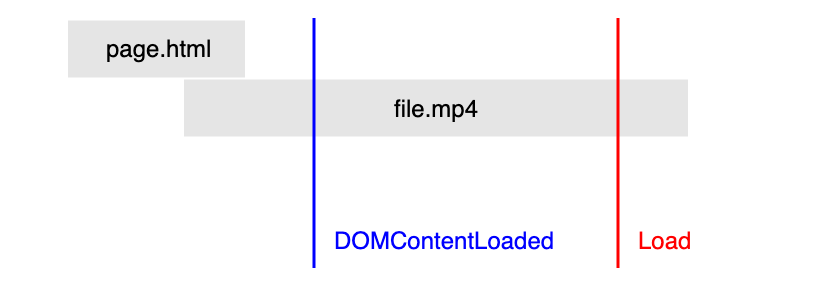
Fast HTML5 Video Playback Using Preload

Enabling a video to playback instantly on your website can be achieved in various ways. Below is an example of fetching the first range of bytes and appending the data to the source buffer The full article and source code can be found here You may also be interested in

1 min read

Laravel in sub directory

As a rule of thumb Laravel will be the platform serving your app. There will be occasions though where Laravel will only be part of your app, therefore you Laravel build may not be located as the base directory. You can put you Laravel directory where ever you want, and

1 min read

Learn Python – Beginners

Microsoft wants you to learn python. It is therefore going to teach you, for free. Two senior engineer las at Microsoft put together over 40 python videos, consisting of 2-3 per video, and uploaded the series to You Tube. You can read the Microsoft blog post, and get links to

1 min read

Convert image url to image – Excel

Add add a new macro called URLPictureInsert and inter the following code. This will take the url from the cell and position the image in the following cell next to it. Ensure the cell is larger than the images otherwise the image could be adjusted with undesirable results. In the

Lazy Load Images Javascript
1 min read

Lazy Load Images Javascript

Here is a light weight solution to lazy loading images in javascript. HTML <img class=”lazy” src=”placeholder-image.jpg” data-src=”image-to-lazy-load-1x.jpg” data-srcset=”image-to-lazy-load-2x.jpg 2x, image-to-lazy-load-1x.jpg 1x” alt=”I’m an image!”> JavaScript document.addEventListener(“DOMContentLoaded”, function() { var lazyImages = [].slice.call(document.querySelectorAll(“img.lazy”)); if (“IntersectionObserver” in window) { let lazyImageObserver = new IntersectionObserver(function(entries, observer) { entries.forEach(function(entry) { if (entry.isIntersecting) { let

1 min read

Switch From PHP 5.6 => PHP 7.2

The PHP 5.6 is set as default version in your system, and you need to switch to PHP 7.2. Run the following commands to switch for Apache and command line. sudo a2dismod php5.6 sudo a2enmod php7.2 sudo service apache2 restart sudo update-alternatives –set php /usr/bin/php7.2 sudo update-alternatives –set phar /usr/bin/phar7.2

1 min read

Laravel could not open input file: artisan

You need to SSH into your server and then change directories so you are at the project root of your laravel build. cd /foo/bar/laravelProject You can then run any artisan commands php artisan –version NOTE: You must change to the working directory as stated above. You cannot simply do something

2 min read

How to Upgrade to PHP 5.6 on CentOS 6

1. Verify current version of PHP Type in the following to see the current PHP version: php -v Should output something like: PHP 5.3.3 (cli) (built: Jul 9 2015 17:39:00) Copyright (c) 1997-2010 The PHP Group Zend Engine v2.3.0, Copyright (c) 1998-2010 Zend Technologies Great, now we can move on!

1 min read

Excel – Divide column at space

Create two new columns One column will have everything before the space =LEFT(A1,FIND(” “,A1,1)-1) The other column will have everything after the space =RIGHT(A1,LEN(A1)-FIND(” “,A1,1))

1 min read

Javascript Object.prototype

The Object.prototype property represents the Object prototype object [source]

1 min read

Promise [advanced]

The Promise object represents the eventual completion (or failure) of an asynchronous operation, and its resulting value. [source]

WordPress – Use SFTP When Installing Themes or PLugins
1 min read

WordPress – Use SFTP When Installing Themes or PLugins

Installing Themes, Plugins, Automatic WordPress Updates, Theme Updates, Plugin Update in WordPress over SFTP With WordPress, installing plugins, updates and themes can be complex when trying to accomplish this via SFTP as opposed to FTP (which is supported within the WordPress core) There is a plugin available to accomplish with

Adding an existing project to GitHub
1 min read

Adding an existing project to GitHub

Adding an existing project to GitHub using the command line Putting your existing work on GitHub can let you share and collaborate in lots of great ways Article source Github help Create a new repository on GitHub. To avoid errors, do not initialize the new repository with README, license, or gitignore files. You can

Creating a FEDERATED Table Using CREATE SERVER
2 min read

Creating a FEDERATED Table Using CREATE SERVER

Article source Mysql Website This article covers creating a Federated table using Create Server. This is a required method when you want to create a Federated table and require password connection on the host database. If you are creating a number of FEDERATED tables on the same server, or if you want

PHP Long script progress bar Using Ajax
1 min read

PHP Long script progress bar Using Ajax

Display A Progress Bar Outputting The Progress Of a Long Running PHP Script Sometimes you may have a PHP script that takes a while to run. To keep the user informed on the progress of the script, and to reassure the user that something is actually happening, it would be

PHP Long script progress bar using SSE
6 min read

PHP Long script progress bar using SSE

If you would like an ajax solution (preferred) please read PHP Long script progress bar Using Ajax Introduction This article is based on an article written on htmly5rocks. I wouldn’t be surprised if you’ve stumbled on this article wondering, “What the heck are Server-Sent Events (SSEs)?” Many people have never heard of them,

2 min read

Enable SSH update/install WordPress

WordPress Tutorial: Using SSH to Install/Upgrade This tutorial will guide you step by step on how to setup your server so you can install new plugins and upgrade existing plugins using an SSH2 layer in PHP and WordPress. What is WordPress? WordPress started in 2003 with a single bit of code to enhance the

1 min read

Install ssh2 Centos

Install the necessary packages before you can build/install ssh2 extension yum install gcc php-devel php-pear libssh2 libssh2-devel make Install the extension, (hit enter for autodetect when it prompts you) pecl install -f ssh2 Once the install is completed, you just have to tell PHP to load the extension when it

Reset File Permissions WordPress
1 min read

Reset File Permissions WordPress

You may need to reset file/directory permissions on your WordPress build. This could be because you have had an error updating WordPress due to failed permissions on certain files/folders. Reset Permissions # Let Apache be owner (on centos this would be apache:apache) sudo chown -R www-data:www-data /path/to/wordpress/build/ # Change location

Install and use pspell on centos
1 min read

Install and use pspell on centos

Install pspell plugin yum install php-pspell Install en dictionary yum install aspell-en Restart apache service httpd restart View code usage example

Install and use pspell on ubuntu php 8
1 min read

Install and use pspell on ubuntu php 8

Command sudo apt-get install libpspell-dev sudo apt-get install php8.0-pspell sudo apt-get install aspell-en Then restart your apache2 server with the following command sudo service apache2 restart PHP $pspell = pspell_new(‘en’,’canadian’,”,’utf-8′,PSPELL_FAST); function spellCheckWord($word) { global $pspell; $autocorrect = TRUE; // Take the string match from preg_replace_callback’s array $word = $word[0]; //

Install Composer on CentOS
1 min read

Install Composer on CentOS

Composer is a tool for dependency management in PHP. It allows you to declare the dependent libraries your project needs and it will install them in your project for you First you have to go to the /tmp directory cd /tmp Download the composer.phar file curl -sS https://getcomposer.org/installer | php

Install wkhtmltopdf on Ubuntu and use with PHP
1 min read

Install wkhtmltopdf on Ubuntu and use with PHP

Install the wkhtmltopdf build sudo apt-get update sudo apt-get install xvfb sudo apt-get install wkhtmltopdf (tested in ubuntu 14.04 x64) Install PHP wrapper Install php wrapper from github using composer composer require mikehaertl/phpwkhtmltopdf

Installing and Using GruntJS
3 min read

Installing and Using GruntJS

Installing Grunt Step 1 – Install Node.js Windows Users: Download and Install node.js onto your computer. Mac Users: I recommend you do this via home-brew as opposed to downloading it from the official website. This will enable you to easily uninstall later, if you wish. Installing it using the official node.js

3 min read

Create A Trigger In Mysql

MySQL trigger syntax Update one table based on another table. This can be achieved when changes are made by using triggers. In order to create a new trigger, you use the CREATE TRIGGER statement. The following illustrates the syntax of the CREATE TRIGGER statement: Let’s examine the syntax above in

Start a build

Tell me where work is getting stuck.

Share the process, bottleneck or idea. I'll reply with a practical first step—not a generic sales pitch.

Sent securely to my inbox. Your details are only used to reply.